PIX6, PIXHAWK, Mini Pix Narrowband Servo Parameter Settings
Normally, full-range servos feature a neutral position at 1500 μs, with pulse width limits ranging from 1000 μs to 2000 μs. PIXHAWK outputs pulses with the same default settings: neutral at 1500 μs, minimum at 1000 μs and maximum at 2000 μs. Therefore, full-range servos work directly with PIXHAWK without extra configuration.
Narrow-range servos, however, have a neutral position of 750 μs and pulse width limits from 450 μs to 1050 μs (values vary by servo model). These specs do not match PIXHAWK's default output, so the servo cannot recognize the signal and will malfunction. Relevant parameters must be adjusted for normal operation.
Warning: Narrow-range servo support is only available on PIXHAWK and Mini Pix when running helicopter firmware, and it is restricted to Channel 4 exclusively.
The following takes the narrow-range servo for helicopter tail rotor as an example. Follow the steps below:
- Connect the PIX flight controller to the ground station.
- Open Software Setup.
- Click Full Parameter List.
- Enter SERVO4 in the search box at the bottom right of the parameter page.
- Modify the parameters: set SERVO4_MAX from the default 2000 to 1050, set SERVO4_MIN from the default 1000 to 450, and set SERVO_TRIM to 750. Ignore the out-of-range prompt and click Yes to confirm.
- Click the button at the top right to write parameters to the flight controller.
- Reboot PIXHAWK. Go to Hardware Setup > Mandatory Hardware, then check the failsafe page to verify the configuration, as shown in the figure below.
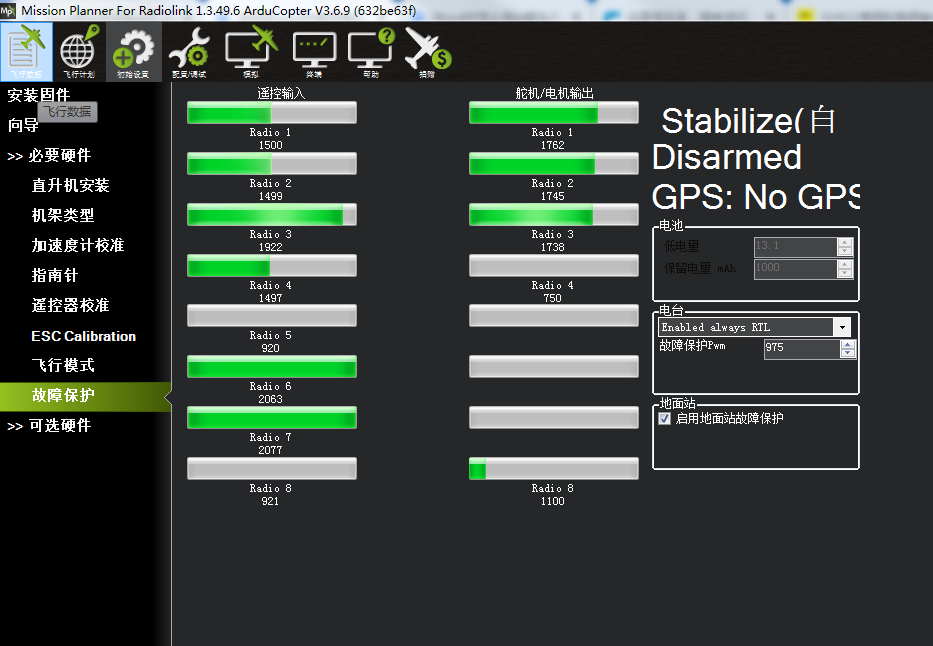
The neutral position of Servo Output 4 is now set to 750, which means the modification is completed. The narrow-range servo can work properly.